

USB-C Docking Stations for OEM and Bulk Procurement
BespokeCable prepares custom USB-C docking stations for device brands, IT rollout teams, and workspace integrators. This page covers USB-C workstation expansion across compact and high-port-count configurations. Selection should begin with the equipment and workflow, not a familiar connector, a port-count label, or an unverified performance claim. A useful request identifies host USB data generation, DisplayPort Alternate Mode, port matrix, simultaneous display requirements, Ethernet, media slots, Power Delivery input, host charging, and operating systems.
USB-C describes the connector, not a guaranteed data generation, video mode, or Power Delivery implementation. Build a controlled matrix that names every host, peripheral, or card used in the project and records which functions must operate at the same time. This turns a broad product name into an assembly or device configuration that engineering, purchasing, and quality teams can review against the same requirements.
For an OEM, wholesale, or bulk program, we can evaluate the enclosure, captive cable, connector orientation, color, marking, label, and packaging around an approved electronics and firmware definition. Available options depend on the selected controller, components, tooling, and order conditions. Compliance marks, protocol logos, transfer rates, charging values, display modes, environmental claims, and operating-system support are not assumed across the collection.
Send a drawing, port map, and device list when available. If you only have a sample or photos, include clear images of every face, connector marking, and model label, plus the intended use and quantity. Send your USB-C docking station requirements for review.
USB-C Docking Station Port-Count Configurations

This live card is labeled 2-in-1. Confirm the actual port types, upstream USB capability, video outputs, concurrent-use limits, Power Delivery path, and enclosure drawing; a numerical port count cannot substitute for a controlled port matrix.
No separate product-detail destination was verified, so the Product Link field must remain empty, and the card CTA must open the inquiry form. Send the target application, host devices, required configuration, quantity, and any photos or drawings for review.

This live card is labeled 3-in-1. Confirm the actual port types, upstream USB capability, video outputs, concurrent-use limits, Power Delivery path, and enclosure drawing; a numerical port count cannot substitute for a controlled port matrix.
No separate product-detail destination was verified, so the Product Link field must remain empty, and the card CTA must open the inquiry form. Send the target application, host devices, required configuration, quantity, and any photos or drawings for review.

This live card is labeled 4-in-1. Confirm the actual port types, upstream USB capability, video outputs, concurrent-use limits, Power Delivery path, and enclosure drawing; a numerical port count cannot substitute for a controlled port matrix.
No separate product-detail destination was verified, so the Product Link field must remain empty, and the card CTA must open the inquiry form. Send the target application, host devices, required configuration, quantity, and any photos or drawings for review.

This live card is labeled 5-in-1. Confirm the actual port types, upstream USB capability, video outputs, concurrent-use limits, Power Delivery path, and enclosure drawing; a numerical port count cannot substitute for a controlled port matrix.
No separate product-detail destination was verified, so the Product Link field must remain empty, and the card CTA must open the inquiry form. Send the target application, host devices, required configuration, quantity, and any photos or drawings for review.

This live card is labeled 6-in-1. Confirm the actual port types, upstream USB capability, video outputs, concurrent-use limits, Power Delivery path, and enclosure drawing; a numerical port count cannot substitute for a controlled port matrix.
No separate product-detail destination was verified, so the Product Link field must remain empty, and the card CTA must open the inquiry form. Send the target application, host devices, required configuration, quantity, and any photos or drawings for review.

This live card is labeled 7-in-1. Confirm the actual port types, upstream USB capability, video outputs, concurrent-use limits, Power Delivery path, and enclosure drawing; a numerical port count cannot substitute for a controlled port matrix.
No separate product-detail destination was verified, so the Product Link field must remain empty, and the card CTA must open the inquiry form. Send the target application, host devices, required configuration, quantity, and any photos or drawings for review.

This live card is labeled 8-in-1. Confirm the actual port types, upstream USB capability, video outputs, concurrent-use limits, Power Delivery path, and enclosure drawing; a numerical port count cannot substitute for a controlled port matrix.
No separate product-detail destination was verified, so the Product Link field must remain empty, and the card CTA must open the inquiry form. Send the target application, host devices, required configuration, quantity, and any photos or drawings for review.
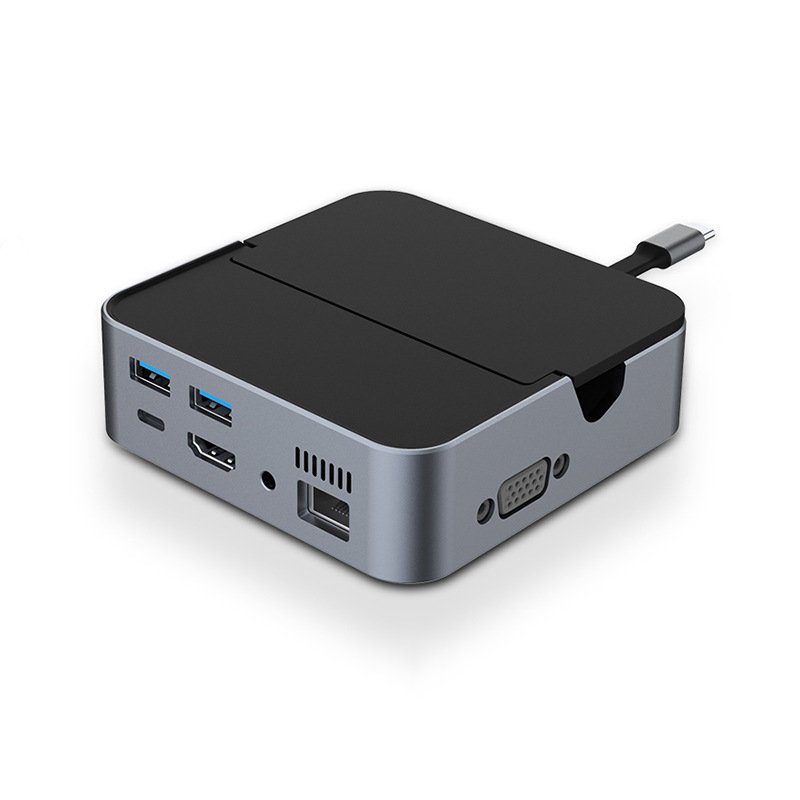
This live card is labeled 9-in-1. Confirm the actual port types, upstream USB capability, video outputs, concurrent-use limits, Power Delivery path, and enclosure drawing; a numerical port count cannot substitute for a controlled port matrix.
No separate product-detail destination was verified, so the Product Link field must remain empty, and the card CTA must open the inquiry form. Send the target application, host devices, required configuration, quantity, and any photos or drawings for review.

This live card is labeled 10-in-1. Confirm the actual port types, upstream USB capability, video outputs, concurrent-use limits, Power Delivery path, and enclosure drawing; a numerical port count cannot substitute for a controlled port matrix.
No separate product-detail destination was verified, so the Product Link field must remain empty, and the card CTA must open the inquiry form. Send the target application, host devices, required configuration, quantity, and any photos or drawings for review.

This live card is labeled 11-in-1. Confirm the actual port types, upstream USB capability, video outputs, concurrent-use limits, Power Delivery path, and enclosure drawing; a numerical port count cannot substitute for a controlled port matrix.
No separate product-detail destination was verified, so the Product Link field must remain empty, and the card CTA must open the inquiry form. Send the target application, host devices, required configuration, quantity, and any photos or drawings for review.

This live card is labeled 12-in-1. Confirm the actual port types, upstream USB capability, video outputs, concurrent-use limits, Power Delivery path, and enclosure drawing; a numerical port count cannot substitute for a controlled port matrix.
No separate product-detail destination was verified, so the Product Link field must remain empty, and the card CTA must open the inquiry form. Send the target application, host devices, required configuration, quantity, and any photos or drawings for review.

This live card is labeled 13-in-1. Confirm the actual port types, upstream USB capability, video outputs, concurrent-use limits, Power Delivery path, and enclosure drawing; a numerical port count cannot substitute for a controlled port matrix.
No separate product-detail destination was verified, so the Product Link field must remain empty, and the card CTA must open the inquiry form. Send the target application, host devices, required configuration, quantity, and any photos or drawings for review.

The second high-port card is currently labeled 13-in-1 on the live page, while its image filename says 15-in-1. Preserve the image and row, but verify the approved title and port matrix before publication; do not infer the count from the filename.
No separate product-detail destination was verified, so the Product Link field must remain empty, and the card CTA must open the inquiry form. Send the target application, host devices, required configuration, quantity, and any photos or drawings for review.
Use port count only as a configuration identifier
The two-in-one high-port-count labels distinguish displayed rows, but they don’t indicate which connectors, controllers, or functions are present. Give each quoted variant an approved port matrix and revision code. Where the source label is ambiguous, retain a neutral configuration name until a drawing or verified port count supports a more specific title.


Document the upstream USB-C capability
Record the host models, exact upstream ports, and the USB data, video Alternate Mode, and Power Delivery functions required from those ports. USB-C identifies the connector system, not a guaranteed combination of capabilities. Keeping host-side evidence separate from the dock feature list prevents unsupported assumptions from entering product naming, sales copy, or sample approval.
Give every downstream receptacle one approved role
For each USB-A, USB-C, display, Ethernet, audio, or media interface, state the direction, protocol, mandatory function, and attached device. If a USB-C receptacle has data, charging, or another role, list those roles explicitly. This port-by-port definition lets buyers compare compact and high-port variants without assuming that similar-looking connectors are interchangeable.


Test the combined display, data and power workload
Describe the simultaneous display arrangement, network traffic, storage or media transfers, and peripheral load expected in service. Qualify that complete scenario on named hosts using the proposed charger, cable, and operating system. Reported values need stated equipment and methods; neither the number of ports nor a theoretical interface limit establishes end-to-end behavior.
Protect each USB-C variant from silent changes
Freeze the approved port matrix, controller and firmware baseline, cable, power design, enclosure drawing, and host test record under one variant identifier. Require review before substituting parts or reusing an image for a different layout. Our quality-control process can follow the agreed inspection plan, while functional and document requirements remain specific to the released configuration.

No. The count does not identify connector types, port roles, controller sharing, display paths, or power design. Compare the approved port matrix and variant code rather than treating two equal-count products as interchangeable.
Either form can be evaluated for a defined configuration. Specify length, connector orientation, exit direction, strain relief, and service expectations, then include the approved cable in host, display, data, and power testing.
No. Power Delivery support, direction, and profiles must be defined for the host, dock, charger, and cable. A USB-C receptacle alone does not establish that the dock accepts power or charges the host.
Only when the approved design assigns and validates both roles. Record the intended peripheral, data function, power direction, and limits to confirm for that receptacle; do not copy the role from another USB-C port.
That is configuration-specific. Define the cards and peripherals used together, the transfers performed, and the duration, then test the combined workload on the approved host. Slot and connector count cannot answer the question.
Specify the required network connection, host and operating system, switch or network environment, cable, and reconnection behavior. Any throughput criterion needs a repeatable method; the presence of an Ethernet connector is not a measured result.
Provide host models, display models, connection types, intended mirrored or extended arrangement, operating-system settings, cables or adapters, and the applications used during testing. Approve only the combinations actually evaluated.
We can evaluate a different layout, but PCB routing, connector clearance, cable exit, thermal conditions, and tooling may need review. Send a dimensioned drawing and treat the revised arrangement as a controlled variant until approved.
Use a unique variant code tied to the title, port matrix, image, drawing, controller, and firmware baseline. Keep that identifier on the quotation, sample record, label, and repeat order so visual similarity does not cause substitution.
Use an approved port matrix, controlled drawing, or verified physical count for the exact configuration. An image filename or an unconfirmed duplicate label is not sufficient evidence to publish a different count or capability.
How to Control a USB-C Docking Station Port Matrix
A USB-C docking station collection can contain many visually distinct port-count configurations. Those labels help buyers reference an image, but they do not reveal the exact connector mix, controller design, video path, charging arrangement, or simultaneous-use behavior. Each row therefore needs a model-specific port matrix before it becomes a quote-ready product definition. The final high-port row remains neutrally named because the available source label and image filename do not provide sufficient evidence for a different port-count claim.
The purpose of the specification is to connect one controlled variant to one host requirement and one acceptance plan. USB-C connector shape alone does not confirm USB generation, display Alternate Mode, or Power Delivery. The following ten steps focus on the configuration decisions that distinguish compact docks from larger multiport layouts without assigning unsupported capabilities to any displayed image.
1. Assign a Unique Variant Identity
Start with the source row, representative image, and current title, then assign an internal variant code that does not depend only on port count. Record the visible connector arrangement and mark every uncertain item for confirmation. Do not rename a configuration from a media filename or visual estimate. A revised public title should be supported by an approved drawing, verified port matrix, or other controlled evidence, especially when two source rows share the same label.
2. Record the Host’s Implemented USB-C Functions
List each host model, operating-system version, and exact port intended for the dock. Document the required USB data path, display Alternate Mode, and Power Delivery role separately. If the host documentation is incomplete, include the needed functions in the sample test rather than assuming them from the receptacle. A host that lacks one required function may expose only part of a dock’s design, so reduced behavior should be recorded explicitly.
3. Define Every Physical Port by Role
Create a matrix row for every downstream receptacle and slot. Include connector type, direction, implemented protocol, intended device, mandatory or optional status, and any shared resource known from the approved design. For downstream USB-C receptacles, distinguish data, charging, and other required roles. For display outputs, Ethernet, audio, and card slots, name the device or media used for validation. This matrix is the authoritative specification; the port-count name is only a navigation aid.
4. Establish the Display Path
State the display models, input connections, intended mirrored or extended arrangement, host graphics conditions, and operating-system settings. Where more than one display is required, define which outputs are used together and how success will be observed. Do not infer display support from the presence of HDMI, DisplayPort, or USB-C connectors in a photograph. Cables and adapters used during approval should remain part of the recorded test setup.
5. Define Power Delivery Direction and Budget
Identify the power source, dock input, required host charging objective, cable requirements, and attached-device demand. Mark which USB-C connection is expected to accept or provide negotiated power. Avoid using a single wattage as a universal promise because the approved profiles, dock consumption, conversion loss, cable and host negotiation all affect the system result. For a data-only variant, say so plainly and omit charging language from the product claim.
6. Allocate Data Functions and Shared Resources
List the USB peripherals, Ethernet connection, card formats, and any audio devices used in the intended workflow. Identify which transfers occur together and whether the design permits simultaneous access to multiple slots or interfaces. If controller sharing affects the use case, define a model-specific acceptance method. A theoretical USB or network figure should not be presented as measured throughput unless the host, device, software, workload, and duration are recorded.
7. Test the Real Simultaneous-Use Scenario
Build a repeatable session that reflects peak expected use: selected displays active, network connected, relevant media mounted, storage transferring, and ordinary peripherals attached. Include connection, hot plug, restart, sleep, and wake only where they matter to the deployment. Record pass criteria and observed limitations for each host group. Testing one empty connector at a time cannot establish how a high-port configuration behaves under a shared workload.
8. Review Cable, Enclosure and Thermal Constraints
Provide captive or detachable cable preference, length, exit direction, strain relief, enclosure dimensions, connector spacing, mounting needs, and ventilation conditions. Confirm clearance around adjacent host and downstream connectors. Evaluate the approved workload in the intended orientation because component placement and enclosure design can influence thermal behavior. Position branding, indicators, and serial labels after the functional and mechanical layout is stable.
9. Approve the Sample and Revision Baseline
Link the variant code to its port matrix, host list, charger and cable, controller and firmware baseline, enclosure drawing, and sample results. Add visual, dimensional, and order-specific document checks without implying that every model receives every available factory test. Require review before changing the controller, power device, PCB, connector, cable, firmware, or housing. A visually similar replacement is not automatically equivalent to the released configuration.
10. Submit a Quote-Ready USB-C Docking Station RFQ
Provide one row per requested variant, so port-count labels cannot hide functional differences.
| RFQ field | Required configuration detail |
|---|---|
| Variant | Controlled code, approved title and representative image reference |
| Host | Models, operating systems, exact ports and required USB-C functions |
| Port matrix | Connector roles, protocols, direction, devices and concurrent use |
| Display | Models, arrangement, outputs, cables and pass criteria |
| Power | Source, profiles to confirm, host objective, cable and device load |
| Mechanical | Housing, cable exit, connector spacing, labels and packaging |
| Approval | Sample quantity, test setup, documents and revision owner |
| Commercial | Quantity by variant, forecast, destination, and requested schedule |
If an approved matrix is not available, send clear photographs of all sides, host model labels, the proposed charger, and the devices used together. We can isolate missing decisions while keeping ambiguous port counts and capabilities out of the published specification. Send your USB-C docking station configuration for review.

